
Smartz Eaze
Smartz Inc.Lifestyle
1.6378.00 Reviews
- Version
- 1.0.1.24
- Installs
- 50.00K
- Age Rating
- Everyone
Screenshots
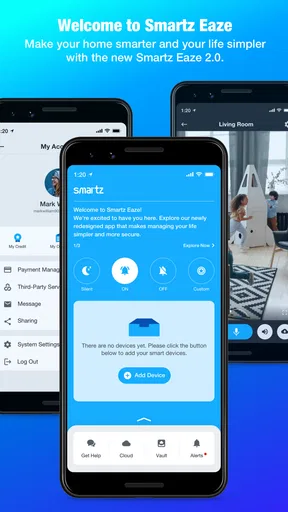
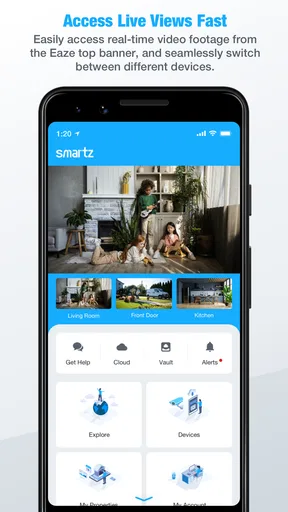
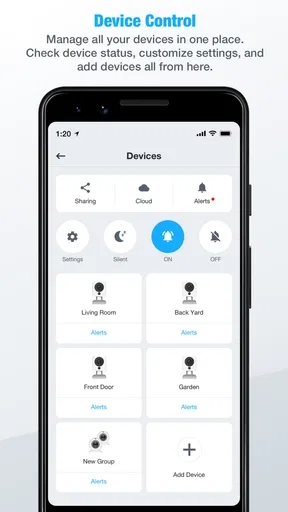
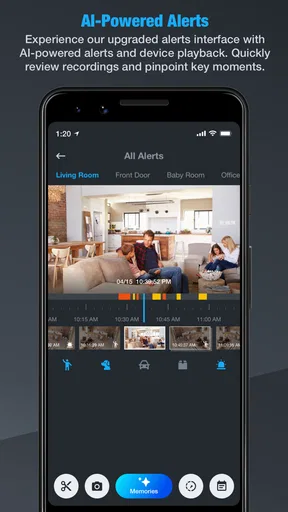
Our Review of Smartz Eaze
 Analysis by Appyee
I judge a property-management app by a simple question: does it make the small, recurring jobs of looking after a home easier to keep track of, or does it add another inbox to check? Smartz Eaze is aimed at simplifying property management, and that focus gives it a more practical purpose than a general-purpose organizer. I’d consider it for coordinating property-related work, but I’d first make sure its actual tools fit the way I manage a home or rental.
That distinction matters because property work is rarely one big task. It is a chain of follow-ups: noticing an issue, recording what needs doing, arranging a visit, and remembering to check that it was resolved. A focused app can help keep those steps in view. It is less compelling if you only need a place to jot down occasional reminders, or if you already have a reliable system everyone involved uses.
A focused tool rather than another general organizer
Smartz Eaze is a free lifestyle app from Smartz Inc. Its average rating is 4.2, based on around 790 ratings, and it has over 10,000 installs. Those figures suggest that people have found a reason to try it, but they cannot tell me whether its approach suits a particular landlord, resident, or property team. I would treat them as context, not a substitute for checking the workflow that matters to me.
There is a useful difference between managing a property and managing a personal to-do list. A household reminder might say “replace the hallway bulb”; a property workflow may also need a clear record of who is handling it and whether the job is complete. That is where a purpose-built service can be more useful than a notebook or a basic task app, provided its process matches the way the people involved communicate.
The app is rated for Everyone and runs on Android from version 5.0. Its current version is 1.0.1.23. It is free to start, with in-app purchases ranging from $0.59 to $399.99 per item, so I would check what any paid option covers before relying on it for a whole property workflow. The range is wide enough that it is worth understanding the cost before inviting others or making the app part of a routine.
Where it can earn a place in a property routine
The most convincing use case is not trying to run every part of property ownership through one screen. It is using a dedicated place to keep the next action from disappearing. For a small landlord, that could mean keeping maintenance follow-ups separate from personal errands. For a resident, it could mean having a consistent place to raise or follow up on a home-related issue, if the property’s setup supports that use.
Picture a weekday evening: you notice a leak under the kitchen sink just before heading out. The useful routine is to record the issue while it is fresh, note the room and what you observed, then check later whether someone has taken responsibility for the next step. The app’s value in that moment is less about grand automation and more about reducing the chance that a detail gets lost in a text thread or on a scrap of paper.
A small but important habit is to write notes so another person can act on them without guessing. “Sink leaking” is less helpful than a concise description of where the water appears and when you noticed it. Whatever property-management workflow you choose, clear entries make handoffs easier and reduce repeated questions. I’d also avoid putting sensitive personal details into routine task notes unless the app’s handling of that information suits your needs.
What to check before making it your main system
Property tools are only useful when the people who need them can follow the same process. Before moving a household or team over, I would test one ordinary task from start to finish: record it, make sure the right person can see it, and confirm that its status is clear afterward. That is a more revealing trial than creating a long list of sample tasks, because it shows whether the app fits the handoff that tends to cause friction.
I would also decide what belongs in the app and what should remain elsewhere. A maintenance reminder may sit comfortably in a property workflow, while contracts, payment records, or urgent safety instructions may need a more appropriate channel or a formal record. The sensible choice depends on the task and the app’s available workflow; no organizer should be treated as a substitute for documentation or direct communication when those are required.
Compared with a shared spreadsheet, a property-focused app may feel easier to use for routine follow-ups, while a spreadsheet can be more flexible for people who want to design their own columns and reporting. A group chat is quick for urgent coordination but can bury decisions under unrelated messages. A general calendar is strong for dates and appointments, yet it may not provide a clear home for the issue that led to an appointment. Smartz Eaze makes most sense if its property-specific approach fills that gap without asking your group to maintain duplicate records.
Who is likely to benefit—and who may prefer something else
I would put this on the shortlist for someone who handles recurring property tasks and wants a more orderly way to keep them visible. It may also suit a small group that needs a shared routine around everyday upkeep, so long as everyone is comfortable using the same app. For a single resident with only occasional reminders, a basic notes app or calendar may be simpler and easier to maintain.
It is not automatically the right choice for a large property operation with complex accounting, formal maintenance dispatch, or detailed reporting needs. Those jobs call for tools chosen around those requirements, rather than an app selected simply because it sounds convenient. I would also be cautious if the people who need to participate will not install or regularly check another app; a theoretically tidy system quickly becomes less useful when key updates still happen in scattered messages.
One practical way to decide is to trial the smallest real workflow you have. Choose a recurring task, agree who enters it and who follows up, and see whether the app makes the next step clearer. If people still need a separate chat to understand the status, that is a sign the process—or the tool—is not yet working for your group. Keeping the trial narrow also makes it easier to judge whether any in-app purchase is worthwhile before building a larger routine around it.
Setting Up and First Impressions
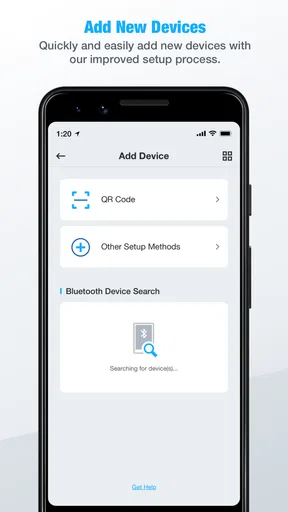
The setup process for Smartz Eaze is as smooth as butter. Once you download it from the app store and get it installed, you’re greeted with a clean and intuitive interface. It’s one of those apps where you don't need a manual to figure things out; everything is pretty much self-explanatory.
Upon opening, the app prompted me to create an account, which took all of two minutes. I appreciated how it doesn’t bombard you with unnecessary permissions. Just the essentials, thank you very much!
Features That Stand Out
Alright, here’s where things get exciting. The app is packed with features, but I’ll touch on a few that really stood out to me:
- Task Management: It has a robust task manager that lets you organize your to-do lists like a pro. You can categorize tasks, set deadlines, and even share them with others.
- Calendar Integration: Syncing with your calendar is seamless, ensuring you never miss an appointment. It even sends reminders, which is a lifesaver for someone as forgetful as me.
- Note-Taking: The note-taking feature is surprisingly comprehensive. It supports text, images, and voice notes, making it versatile for different needs.
- Customization: You can tweak the app’s appearance to suit your style. I spent a good chunk of time playing around with themes and widgets.
One of my favorite bits is how everything is so interconnected. Add a task, and you can link it to a calendar event or a note. It’s these little details that make a big difference in usability.
Daily Use and Performance
Now, I’ve been using the app daily for a couple of weeks, and it’s genuinely helped me stay on top of things. The app runs smoothly, with no noticeable lag or crashes, which is something I can’t say for every app out there.
Switching between features is a breeze, and I’ve yet to encounter any bugs. The developers have clearly put a lot of thought into the user experience, and it shows. The app doesn’t drain the battery excessively, and it doesn’t hog data, which is always a plus in my book.
Who Will Love This App?
Honestly, Smartz Eaze has something for everyone. Whether you’re a student juggling assignments, a professional managing multiple projects, or just someone who likes keeping things organized, this app has you covered.
The social sharing feature is also a neat addition. You can easily collaborate with friends or colleagues on tasks or projects. I found this particularly useful for group work and planning events.
Final Thoughts
In a world full of apps vying for our attention, Smartz Eaze manages to stand out with its practicality and user-friendly design. It’s a versatile tool that can adapt to various needs, all while keeping things simple and efficient.
If you’re in the market for an app that can help you get a grip on your daily chaos, I’d highly recommend giving Smartz Eaze a whirl. You can find it on both Android and iOS, and trust me, it’s worth the download.
Verdict
Strengths of Smartz Eaze
- User-friendly interface makes navigation simple.
- Wide range of customization options available.
- Lightweight app with fast loading times.
- Compatible with both Android and iOS devices.
- Includes helpful tutorials for new users.
Limitations of Smartz Eaze
- Limited free features in the basic version.
- Occasional ads disrupt user experience.
- Requires internet connection for full functionality.
- Some features locked behind a paywall.
- Notifications can be frequent and intrusive.
Similar Picks in This Category
View All
SmartThings
Samsung Electronics Co., Ltd.4.6

Google Home
Google LLC4.0

Pinterest4.2

Astrotalk - Talk to Astrologer
Astrology & Horoscope4.7

My Verizon
Verizon Consumer Group4.5

Samsung Wallet (Samsung Pay)
Samsung Electronics Co., Ltd.4.1
Frequently Asked Questions
What is Smartz Eaze and what does it do?
Smartz Eaze is a productivity app designed to streamline task management for both personal and professional use. It offers features such as task scheduling, reminders, collaboration tools, and progress tracking. The app integrates seamlessly with various calendar and productivity suites, making it an all-in-one solution for staying organized and efficient.
Is Smartz Eaze available for both Android and iOS devices?
Yes, Smartz Eaze is available for both Android and iOS platforms. Users can download the app from Google Play Store for Android devices and the Apple App Store for iOS devices. The app provides a consistent experience across both platforms, ensuring that users can manage their tasks seamlessly regardless of their device.
Does Smartz Eaze offer any free features, or is it subscription-based?
Smartz Eaze offers a free version with basic features such as task creation, reminders, and a limited number of projects. For advanced features like collaboration tools, unlimited projects, and advanced analytics, users can opt for a subscription plan. The subscription enhances productivity by unlocking additional functionalities tailored for professional use.
How does Smartz Eaze handle user data and privacy?
Smartz Eaze prioritizes user privacy and data security. The app employs encryption protocols to protect user data and complies with GDPR and other privacy regulations. Users have full control over their data, with options to export or delete their information at any time, ensuring transparency and security in data management.
Can Smartz Eaze integrate with other productivity tools?
Yes, Smartz Eaze is designed to integrate with a variety of productivity tools and platforms, including Google Calendar, Microsoft Outlook, and Trello. This integration allows users to sync their tasks and schedules across different applications, enhancing workflow efficiency and ensuring that all tasks are managed from a single, unified interface.
